
Smart Tab Grouping for Cleaner Browsing
Overview
Tabease is a desktop productivity tool designed to simplify web browsing by automating tab organization. It helps users manage large numbers of open tabs by grouping them based on domain after a configurable timeout. This reduces visual clutter in the browser tab bar, enhancing focus and workflow efficiency. The software is particularly useful for professionals and frequent internet users who juggle multiple projects, research tasks, or online workflows across different websites.
Users can customize the grouping behavior per domain, allowing for granular control over which sites are grouped and when. Essential websites can be pinned to remain open and ungrouped, ensuring quick access to frequently used tools or services. The extension also includes a popup interface that allows users to close all tabs from a specific domain with a single click, improving cleanup speed and reducing accidental tab loss.
Available for Windows, Mac, and Linux, Tabease integrates directly into the browser environment without requiring additional system installations. It operates as a browser extension, making it accessible across multiple devices where the browser is synced. The developer, Tabease, did not provide further details about company background or development history. Real-world use cases include research workflows, content creation, e-commerce management, and remote work tasks where tab overload is common.
Key Features & Capabilities
- Auto Tab Grouping – Automatically groups tabs by domain after a default or user-defined timeout, reducing tab bar congestion and improving navigation.
- Domain-Specific Timers – Users can set custom timeouts for individual domains, allowing flexibility in how quickly or slowly tabs are grouped based on usage patterns.
- Pin Critical Domains – Specific websites can be pinned to remain open and ungrouped, ensuring important tools like email, messaging, or project management platforms stay accessible.
- One-Click Domain Closure – The Tabease popup allows users to close all tabs from a single domain instantly, streamlining cleanup after completing a task.
- Minimalist Tab Minimization – Grouped tabs are minimized into compact, collapsible entries, freeing up valuable screen space without losing access to content.
These features are especially beneficial in scenarios involving extended browsing sessions, such as academic research, online course management, or multi-platform project coordination. For example, a user researching three different topics can set longer timeouts for one domain while auto-grouping others immediately. The ability to pin essential sites ensures that communication tools remain visible at all times, preventing workflow interruptions.
User Interface, Workflow & Performance
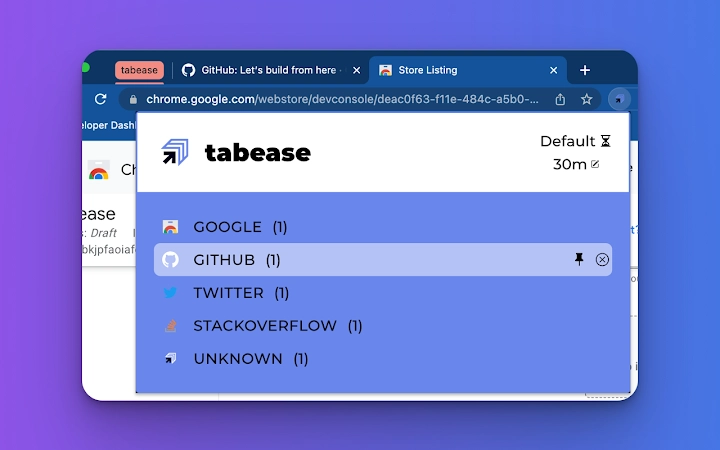
The user interface of Tabease is designed to be lightweight and unobtrusive. It operates primarily through a small icon in the browser toolbar, which expands into a popup menu when clicked. The popup displays a list of currently grouped domains, with options to expand groups, close all tabs from a domain, or adjust settings. Navigation is intuitive, with minimal clicks required to access core functions.
Workflow efficiency is enhanced by the automatic grouping logic, which requires no manual intervention once configured. Users can set up their preferences once and rely on consistent behavior across browsing sessions. The extension integrates seamlessly with the browser’s native tab system, maintaining compatibility with standard navigation actions like dragging, right-clicking, and keyboard shortcuts.
Performance details were not specified by the developer. However, based on its 1.5 MB file size and lightweight functionality, it is expected to have minimal impact on system resources. The extension does not appear to require constant background processes. Stability is assumed to be consistent with typical browser extension behavior, though exact performance metrics are not available.
Compatibility & System Requirements
Tabease is compatible with Windows, Mac, and Linux operating systems. It functions as a browser extension, meaning its performance and availability depend on the supported browsers available on each platform. The software version is 1.2.3, and the installation size is 1.5 MB, indicating a compact footprint.
Exact system requirements were not listed by the developer. No specific hardware specifications, such as CPU or RAM thresholds, were provided. Compatibility information is limited to the operating systems and the extension model. Users should ensure their browser is up to date and supports extensions to use Tabease effectively. The developer did not specify whether the extension is available on all major browsers or only select ones.
Pros and Cons
Pros
- Automatically organizes tabs by domain to reduce clutter
- Supports custom timeouts per website for personalized control
- Allows pinning of essential domains to remain ungrouped
- One-click closure of all tabs from a single domain
- Lightweight design with minimal resource usage
- Free to use with no hidden costs
- Available across Windows, Mac, and Linux platforms
Cons
- Does not support custom grouping rules beyond domain-based logic
- Exact browser compatibility details were not provided
- Performance data and resource usage metrics were not specified
- Limited to browser extension functionality — no standalone desktop application
- No built-in backup or sync across devices beyond browser sync
FAQ Section
Is Tabease compatible with my browser?
Tabease is designed to work as a browser extension on Windows, Mac, and Linux. Compatibility depends on your browser’s support for extensions. The developer did not specify which browsers are supported.
Is Tabease safe to use?
Tabease operates within the browser’s extension environment and does not access or transmit user data beyond necessary tab management functions. No security vulnerabilities were reported. Users should only install extensions from official browser stores.
How often does Tabease update?
The latest version is 1.2.3, released on May 15, 2024. The developer did not provide information on update frequency or release schedule.
Can I use Tabease offline?
Yes, Tabease functions entirely offline once installed. It does not require an internet connection to group tabs, pin domains, or close tab sets.
Is Tabease free to download and use?
Yes, Tabease is completely free. There are no subscription fees, in-app purchases, or premium features. The software is available at no cost to all users.
Final Thoughts + CTA
Tabease delivers a focused, effective solution for users overwhelmed by tab overload. Its ability to automatically group tabs by domain, combined with domain-specific timers and the option to pin critical sites, makes it a valuable addition to any productivity toolkit. The minimalist interface ensures it doesn’t interfere with browsing, while its lightweight design minimizes system impact.
While it lacks advanced customization and cross-device sync, its core functionality is reliable and well-executed. For professionals, students, and anyone managing multiple online tasks, Tabease provides a clean, efficient way to maintain control over their browser workspace. The fact that it’s free and available on all major operating systems adds significant value.
Download Tabease now and reclaim your tab bar with smarter organization.







